
Give different customers different rewards
A customer group gives some shoppers their own rewards bar. Use it for wholesale customers, Shopify B2B buyers, or shoppers in one market. For example, offer free shipping only in the United States, or no free gift to wholesale accounts.
Add a customer group
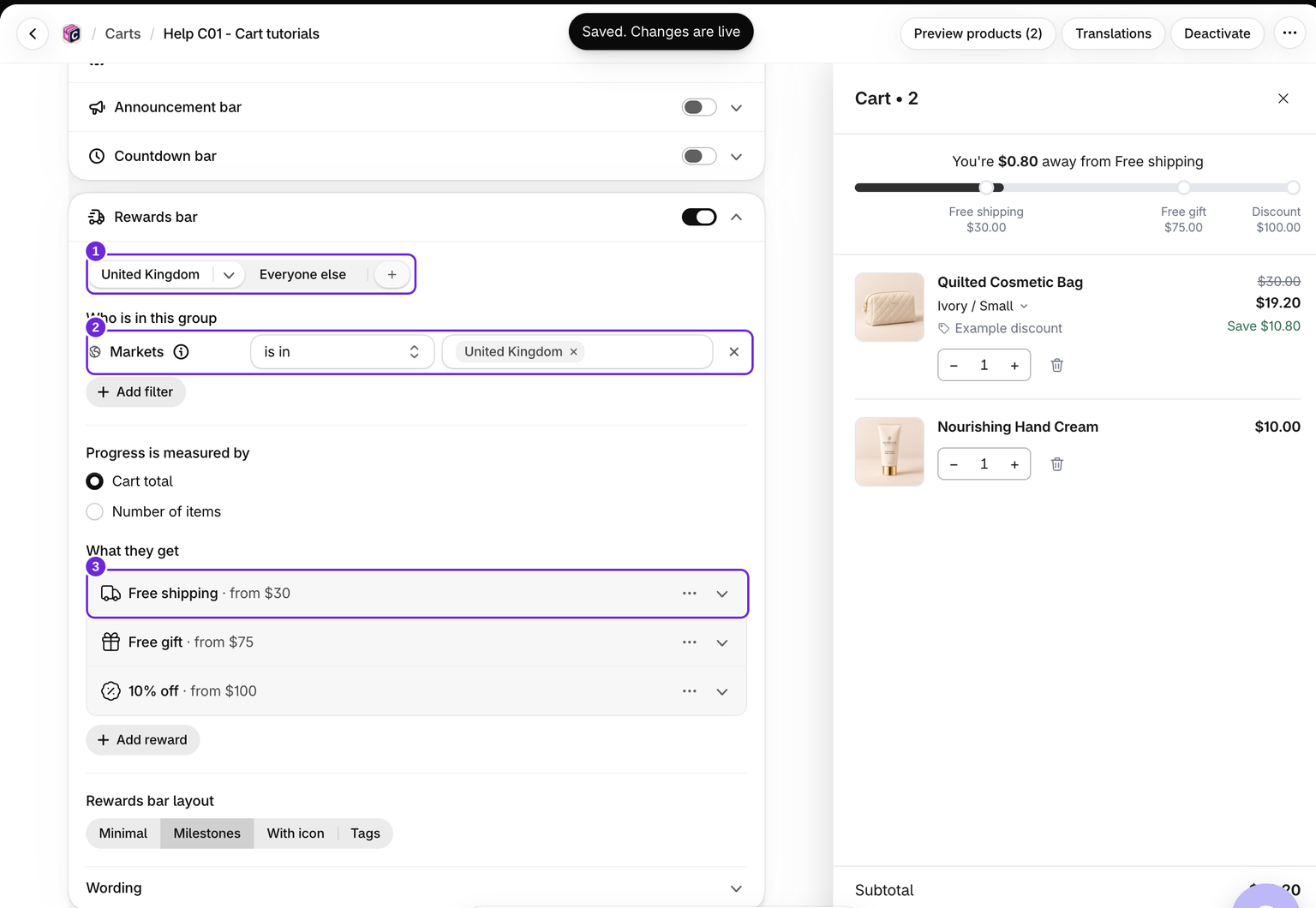
- Edit your cart and open Cart > Rewards bar.
- Click the + at the right end of the group tabs (Add customer group). The new group starts with a copy of the rewards on the last tab, All customers or Everyone else.
- Under Who is in this group, click Add filter and pick one:
- Customer tags: choose has any of or has none of, then type each tag exactly as in Shopify and press Enter.
- Shopify B2B: choose Only B2B company customers or Hide from B2B company customers.
- Markets: choose is in or is not in, then pick the markets.
- Set the group's Progress is measured by, change or add rewards with Add reward, and pick its Rewards bar layout.
- Save the cart. If it is not active yet, activate it.
A group needs at least one filter. The cart cannot be saved while a group has none. The menu on a group's tab has Rename group, Move left, Move right, Duplicate group and Remove group.
For rewards available only to one audience, you can instead use Add filter directly on All customers or Everyone else. Below the group limit, this moves those rewards into a new filtered group and leaves Everyone else empty. Using the + copies the rewards, so review the fallback tab separately.
Which group a shopper gets
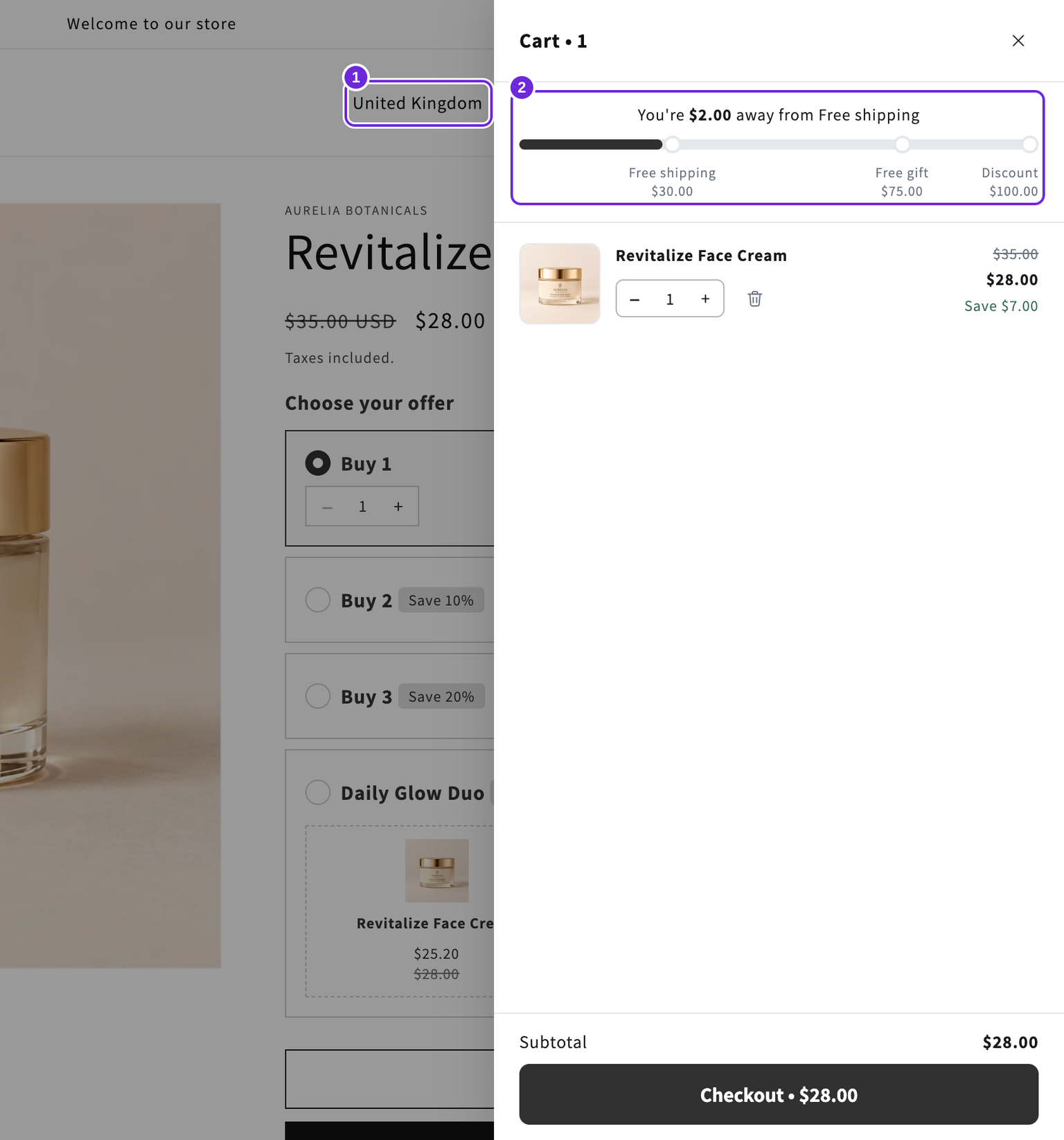
- Every filter in a group must fit. A group with a tag filter and a Markets filter needs both. For "this tag or a B2B buyer", make two groups with the same rewards.
- A shopper gets the first group, from left to right, whose filters fit. Put your most specific group first.
- A shopper who fits no group gets the Everyone else bar, the last tab. Before you add a group, that tab is called All customers.
- A group can have no rewards. Its shoppers then see no bar and get no reward at checkout.
- You can add up to 10 groups.
Each group has its own rewards, its own Progress is measured by and its own Rewards bar layout. The wording and style of the bar are shared by all groups.
What happens at checkout
Checkout gives only the rewards of the shopper's own group, never another group's. Two things can differ from what the drawer showed:
- The drawer picks the group by the country the shopper browses from. Free shipping at checkout follows the delivery address. If only the US group has eligible free shipping, a shopper who browses from the US and ships to Canada pays for shipping.
- Tags and B2B follow the customer Shopify knows. A wholesale customer browsing logged out may see a different bar. Checkout can select their tagged or B2B group once Shopify recognises them.
If the group at checkout differs from the group that supplied an already-added gift, the gift can be charged. Test both storefront and checkout identity before launching restricted gift rewards.
The Shopify B2B filter only sees Shopify B2B companies. A wholesale app that tags its customers is not detected. Use Customer tags for those customers.
Markets
Markets come from Markets in your Shopify admin. A shopper is matched by the country they browse from. Thresholds are entered in your store currency and converted for the shopper's currency. A group can select up to 50 markets; a market without countries cannot be selected.
If you later change which countries a market covers in Shopify, the editor shows a banner naming the market and the groups that use it. Click Update countries to bring the groups up to date.
Translations and testing
On the Translations page, each group's reward names sit under Rewards bar: followed by the group name.
The editor preview shows the group whose tab is open and checks no filter. Test on your storefront: once as a guest, once logged in as a tagged customer, and once from a country in the market. Then go to checkout and check the reward there.
The cart's own Who sees this cart rule still decides who gets the drawer at all. See also set up a rewards bar and free shipping.
Was this article helpful?
Your feedback helps us improve our docs.